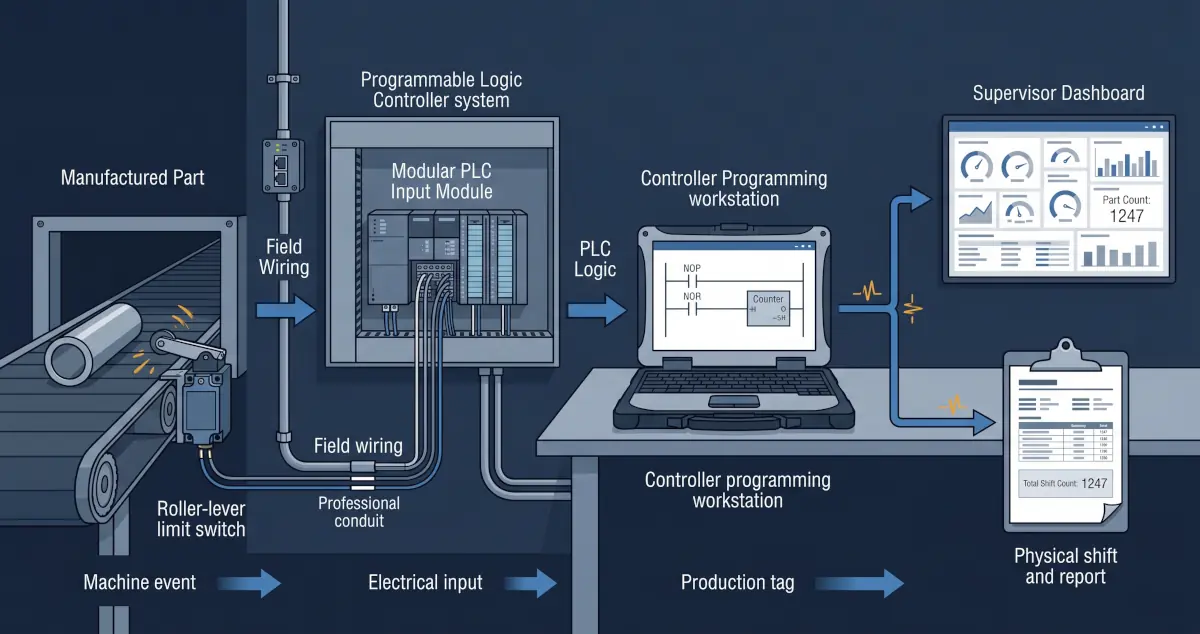
The short answer
The safest practical approach is to keep the production dashboard outside the machine-control path and expose a small, documented, mostly read-only set of PLC data through a controlled interface. The machine should continue operating normally if the dashboard, database, reporting server, or business network becomes unavailable.
A successful project does more than establish communications. It defines what each value means, preserves timestamps and quality, separates control traffic from reporting traffic, validates totals against the physical process, and gives operations a clear recovery procedure.
Start with the business questions, not the dashboard software
Many dashboard projects begin with a request to display every available PLC tag. That creates noise, unnecessary controller traffic, and a reporting system nobody fully trusts. Begin by defining the decisions the dashboard must support.
- Do supervisors need current count, rate, target, or estimated completion time?
- Which machine states distinguish production, setup, blocked, starved, faulted, and stopped?
- Does the business need gross count, good count, rejects, rework, or shipped units?
- How are shifts, products, work orders, recipes, and changeovers identified?
- What must remain available during a network or server outage?
- Who owns the meaning of each value and validates it against production?
The dashboard can only be accurate when the underlying events and definitions are accurate. A polished chart built on an ambiguous machine-state bit is still an ambiguous chart.
Choose a data architecture that respects the control system
The correct integration method depends on the controller, existing software, production criticality, update rate, network design, and required history. A direct dashboard connection to a PLC may be acceptable for a small, carefully controlled application. Larger or more critical environments usually benefit from an industrial gateway, historian, or another intermediate data service.
| Approach | Where it fits | Important tradeoff |
|---|---|---|
| Direct read-only PLC connection | Small scope, limited tags, modest update rate, and a well-understood controller | The dashboard client communicates directly with the controller and must be tightly controlled |
| Industrial gateway | Multiple protocols, controller isolation, normalized tags, or controlled data transfer | Adds a managed component that requires configuration, backup, and monitoring |
| Historian or data collector | Long-term trends, event history, reporting, and multiple production assets | Requires deliberate storage, timestamp, retention, and recovery design |
| Existing SCADA data source | A maintained platform already collects the required values reliably | Reporting changes must respect the existing system's ownership and performance |
Do not assume that because a controller has an Ethernet port it should be reachable from the office network. Use network segmentation, explicit access rules, and the smallest necessary communication path. The reporting layer should normally receive data without gaining broad programming or write access.
Design for communication failures and stale data
A dashboard that silently displays yesterday's last known value can mislead operations more than a dashboard that clearly reports a failure. Every production-data integration needs an explicit strategy for unavailable, delayed, duplicated, and out-of-order data.
Display communication status, last update time, and stale-data warnings beside production values.
Decide whether data must survive a server or network outage and where that history will be retained.
Confirm the machine continues its approved operation when every reporting component is offline.
Polling rates also matter. Faster is not automatically better. Collect data at a rate appropriate to the business question, controller capacity, and event duration. A shift report may not need subsecond updates, while a short downtime event may require event-based capture or faster sampling.
Build views around operational decisions
Different users need different levels of detail. Operators may need immediate machine state and target progress. Supervisors may need shift comparisons and downtime. Management may need reliable summaries linked to orders or production plans.
A useful dashboard should make abnormal conditions easy to recognize without turning every value into an alarm. It should explain the time period, units, machine, product, and data quality visible on the screen. Historical charts should preserve enough context to distinguish a true production issue from a communication failure or planned shutdown.
Automated exports can move approved production totals into quality, maintenance, inventory, or management workflows. Treat those integrations as business interfaces with documented ownership and validation, not as informal spreadsheet feeds that happen to work today.
A practical PLC dashboard implementation plan
- Define the decisions. Agree on the production questions, users, update rates, and required history.
- Audit the source. Review controller capacity, available tags, program ownership, network path, and existing data systems.
- Design the interface. Select a limited set of documented production tags with timestamps and quality indicators.
- Separate the systems. Place dashboards and reporting outside the control path with appropriate OT network segmentation.
- Build failure behaviour. Make stale data visible and confirm reporting outages cannot stop production.
- Validate against reality. Compare totals, states, shifts, and downtime against the physical process with operators.
- Document and maintain it. Record the architecture, tag definitions, credentials, backups, recovery steps, and ownership.
Rugged Technology Services builds these complete data paths through our industrial systems integration services in New Brunswick, from PLC and OT network review through production dashboards, automated reports, and secure remote management.
Primary source
Industrial integrations are site-specific. Controller changes, network changes, and commissioning should be completed by qualified personnel using the facility's safety and change-control procedures.

About the author
JR
JR works across industrial systems integration, operational technology, embedded systems, Linux administration, and networking at Rugged Technology Services.
Read JR's profile